Upload or Paste Your Image
Drop, click, or paste an image into the image splitter.

Split one image into equal grids, rows, columns, or image tiles. Use Generic Split for equal tiles, or switch to Instagram Carousel for platform-ready ratios, preview, posting order, and ZIP export.
3 slides · 4:5 → Recommended canvas: 3240 × 1350 px
Drag the source preview or use the position sliders and Zoom to refine the crop.
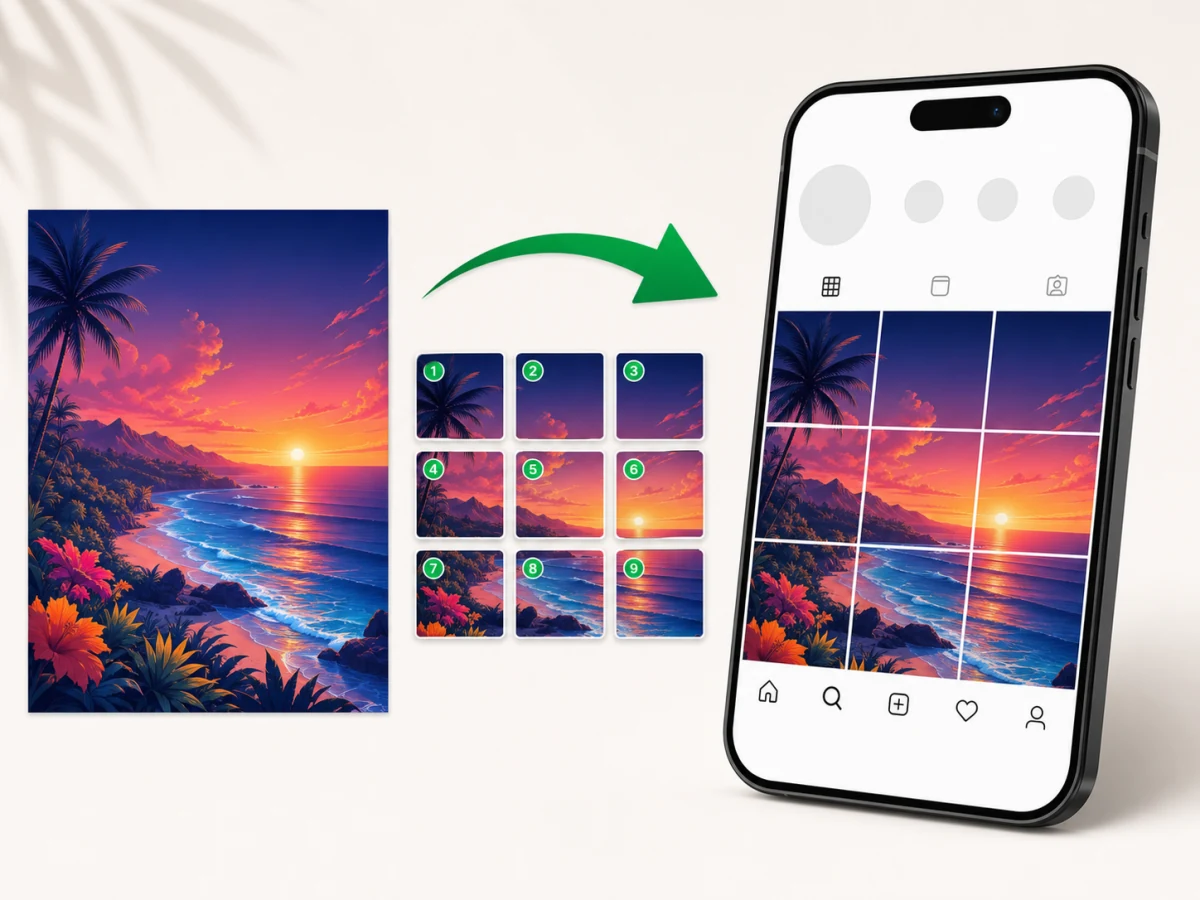
Use this image splitter online when you already have one finished visual and need clean, equal pieces without opening a heavy editor.
JPG, PNG, WebP, GIF, AVIF, and other browser-supported image files.
Preset grids plus custom rows and columns from 1 × 1 to 12 × 12.
Download individual image tiles, or export all split images together as a ZIP file.
The image is processed in your browser with Canvas. No upload is required for the split.
An image splitter cuts one picture into smaller tiles based on a grid, row count, or column count. It is useful for website assets, design mockups, classroom materials, puzzles, and multi-image layouts.
Unlike repeating a crop by hand, the splitter calculates every boundary from the same source image and keeps all source pixels. When the dimensions do not divide exactly, edge tiles may differ by one pixel.
This tool focuses on predictable image splitting: choose a preset such as 3x3, enter a custom grid size, preview the cut lines, and download the resulting tiles without sending the source image to a server.
Upload an image, choose the cut layout, preview the lines, and export every tile without sending the image file to a server.
Drop, click, or paste an image into the image splitter.
Choose a quick preset, or open Custom to enter your own row and column count.
Check the live preview before exporting PNG, JPG, or WebP tiles.
Export all split images together as a ZIP file.
Generic Split names every tile by row and column. Instagram Carousel adds slide ratios, crop or background fit, a platform preview, numbered posting order, and a ZIP guide.
Use the same equal-split engine for grids, single-row sequences, single-column sequences, mockups, and reusable visual assets.
Choose a preset grid or enter custom rows and columns to divide one image into equal tiles for layouts, mockups, social posts, and web assets.
Use a 1x3 layout when one finished image should become three equal side-by-side tiles. Review both cut lines and keep important text inside one tile.
Open the TikTok Banner Splitter for a task-specific 1x3 starting point, ordered file names, and publishing checks.
Use Instagram Carousel for 2 to 10 publish-ready slides with 1:1, 4:5, or 3:4 output and left-to-right posting order. For a profile mosaic, Generic Split can still create a 3x3 starting point; verify Instagram's current profile crop before publishing.
Open the dedicated Instagram Carousel Splitter for a task-specific starting point, recommended canvas feedback, and posting-order export.
Open the Instagram Grid Maker when one photo should become nine equal profile-grid tiles.
Create 2x2, 3x3, 4x4, or custom equal pieces for grids, puzzles, class materials, product boards, and visual planning.
Open the equal-parts tool for direct vertical, horizontal, and custom row-and-column guidance.
The tool does not resize the source before splitting. PNG is lossless; JPG and WebP may apply compression based on the selected quality.
The uploaded image is decoded in your browser and split with Canvas. The page does not send the file to a backend, so private images, client drafts, campaign mockups, and unreleased product visuals stay on your device.
Use quick presets such as 1x2, 1x3, 2x2, 3x3, and 4x4, or enter a custom grid when you need a specific number of rows and columns.
Export PNG for sharp graphics, JPG for photos, WebP for smaller modern image tiles, or a ZIP file when you need every split image together.
Exported image tiles are clean. The tool does not add a logo, frame, or watermark to your split images.
The image splitter works directly in a modern browser without sign-up or installation, with upload, preview, split, and download controls available on phone-sized screens.
No. The image splitter runs locally in your browser and creates tiles with Canvas.
The page does not store your original image, exported tiles, file name, or image contents. Analytics events only describe tool interactions, not the uploaded file.
Because this image splitter online runs on your device, the workflow is suitable for client drafts, unreleased campaigns, private photos, and internal design mockups.
Yes. This image splitter online is free to use for the core browser-based splitting workflow.
Yes. Switch to Instagram Carousel to create 2 to 10 slides in 1:1, 4:5, or 3:4, preview crop or background fit, and export numbered files with a posting guide. Use Generic Split when you need an equal profile-grid starting point.
Yes. Export your Canva design as an image file first, then upload that file here to split it into equal grid tiles.
You can upload common browser-supported image formats such as JPG, PNG, WebP, GIF, and AVIF, then export tiles as PNG, JPG, or WebP.
Yes. Download each tile individually or export all generated image tiles together as a ZIP file.
The tool creates tiles from the source image pixels. Choose PNG for crisp graphics, or adjust JPG quality when smaller photo files matter more.